AndiaMusic player for Jellyfin

All your music,
in your pocket.

Andia plays your Jellyfin server’s library in an app built for iPhone: beautiful, fast, and at home everywhere in the system.

Coming soon to the App StoreDiscover

For iPhone

The Now Playing screen: artwork, spectrum, format being played and controls

Your Jellyfin server

Your music,
at home.

Andia connects straight to your Jellyfin server, at home or over the internet. No account to create, no subscription, no ads: just your library, organized the way you like it.

Jellyfin
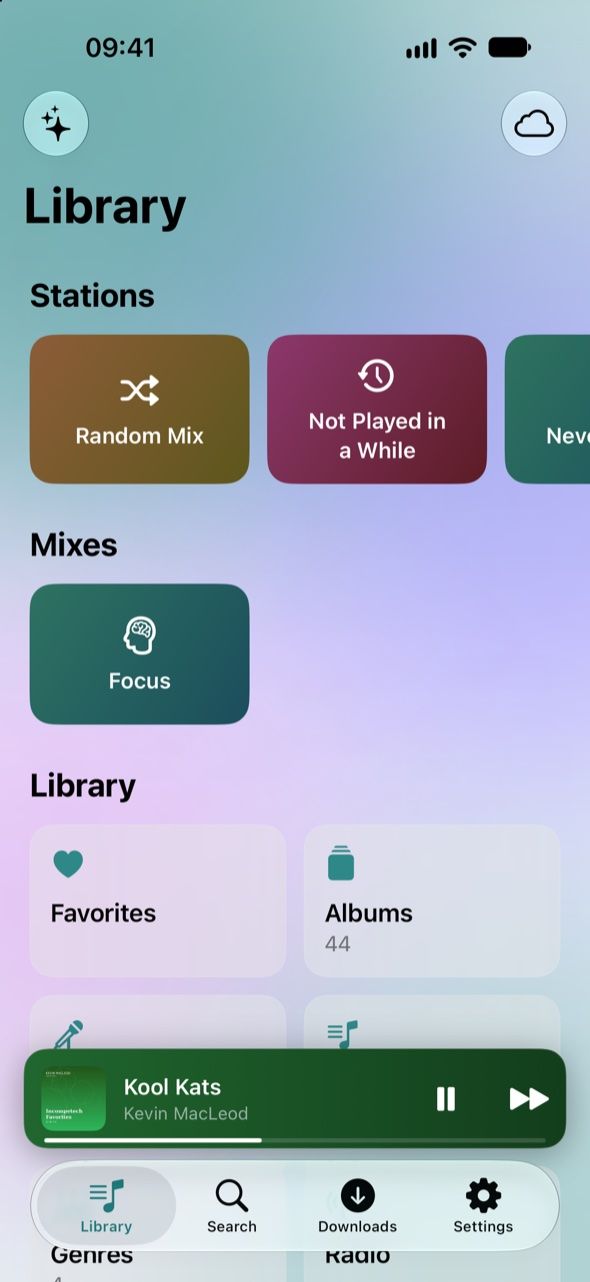
The library home: stations, mood mixes and categories
  • At home192.168.1.10:8096
  • Over the internethttps://
  • iOS keychain
  • No third-party account

Your whole library

Albums, artists, playlists and genres, with an A–Z index. Artist pages have their photo and biography, and multi-disc albums play straight through. All the music libraries on your server show up by default; with Andia Plus, choose which ones to show.
Instant search

Albums, artists and playlists show up from the very first letter, songs as soon as the server answers.

A secure connection

Your credentials stay in your device’s keychain. Self-signed certificate? Andia shows you its fingerprint, then trusts that one alone.

You need an iPhone running iOS 17 or later and a Jellyfin server, version 10.9 or later. No server yet? It’s free and open source: discover Jellyfin

Now Playing

Just
press play.

Tap a song and the music starts. Everything else is right there, under your thumb.

  1. Artwork, front and center

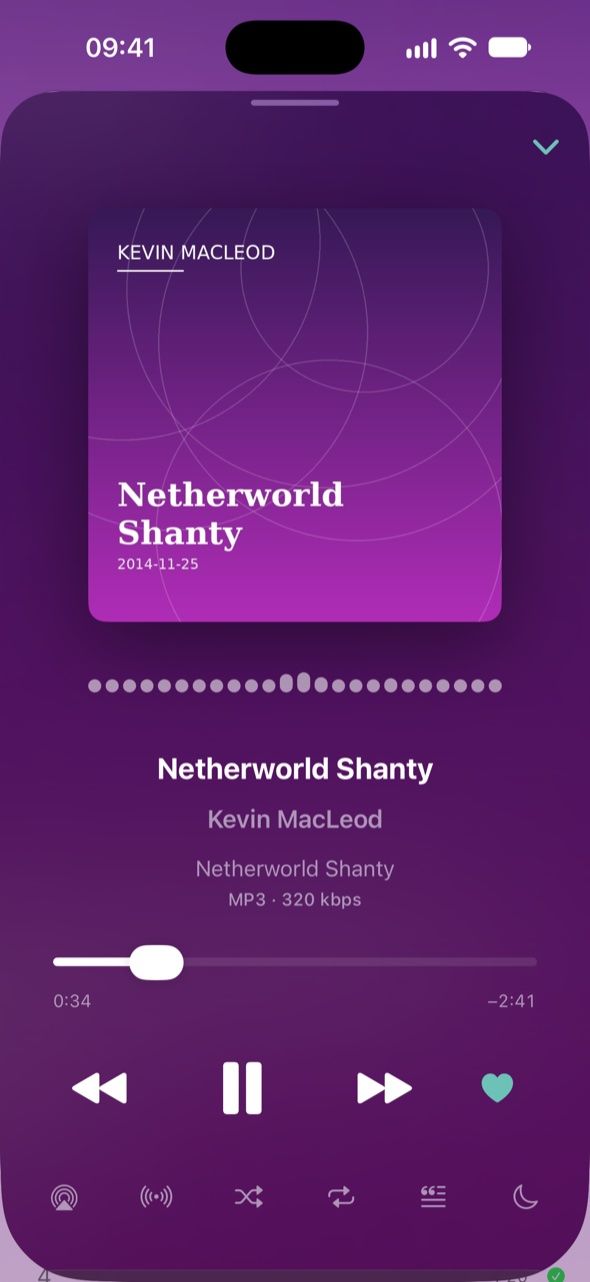
    A blurred backdrop in the album’s colors, a spectrum that dances with the music, and the format being played, from “MP3 · 256 kbps” to “FLAC · 24-bit / 96 kHz”.

    The Now Playing screen: artwork, spectrum, format being played and controls
  2. Lyrics that keep up

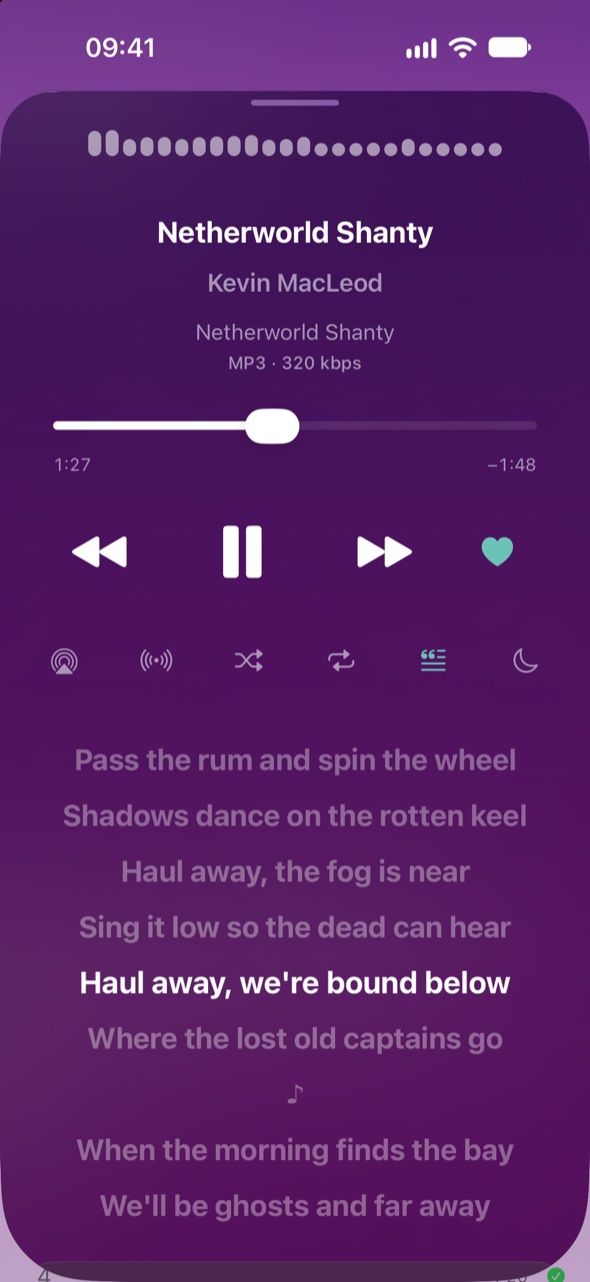
    Synced lyrics scroll beneath the controls, in time with the song. A swipe on the mini player skips to the next song.

    Synced lyrics beneath the playback controls
  3. A ten-band equalizer

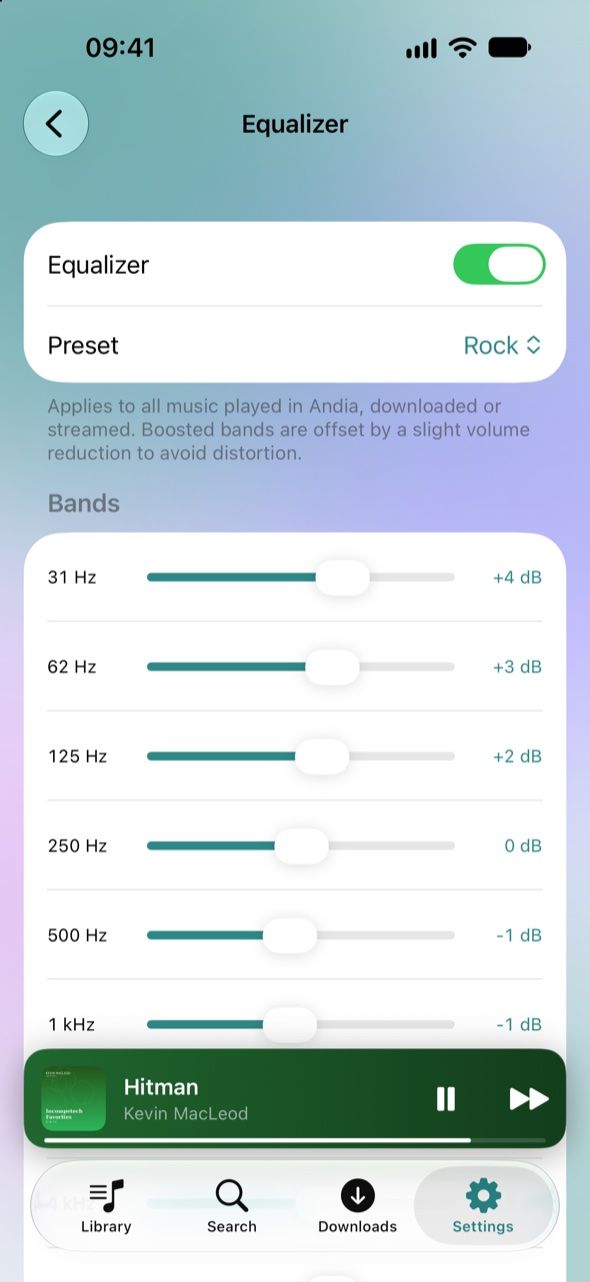
    From 31 Hz to 16 kHz, with presets. Boosted bands are balanced by a slight volume cut, so the sound never clips. With Andia Plus.

    Ten-band equalizer with the Rock preset
  4. Every page in its own colors

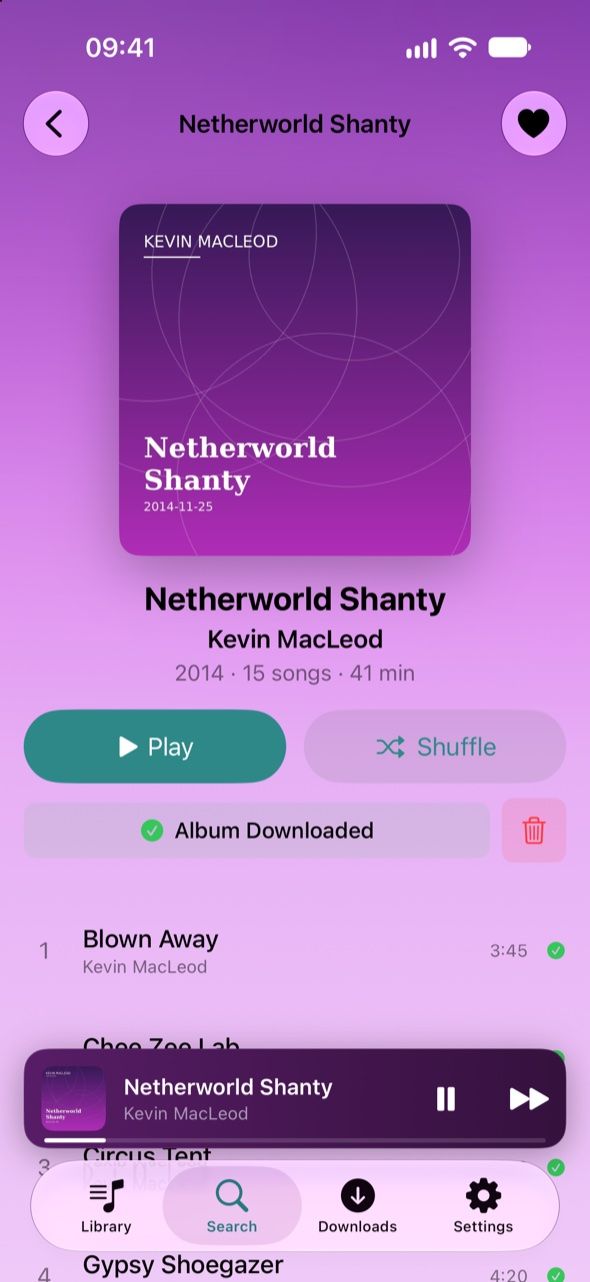
    Albums, artists and playlists take on the hue of their artwork. Tap the heart and the song is saved as a favorite on your server.

    An album page in the colors of its artwork
  5. Artist pages

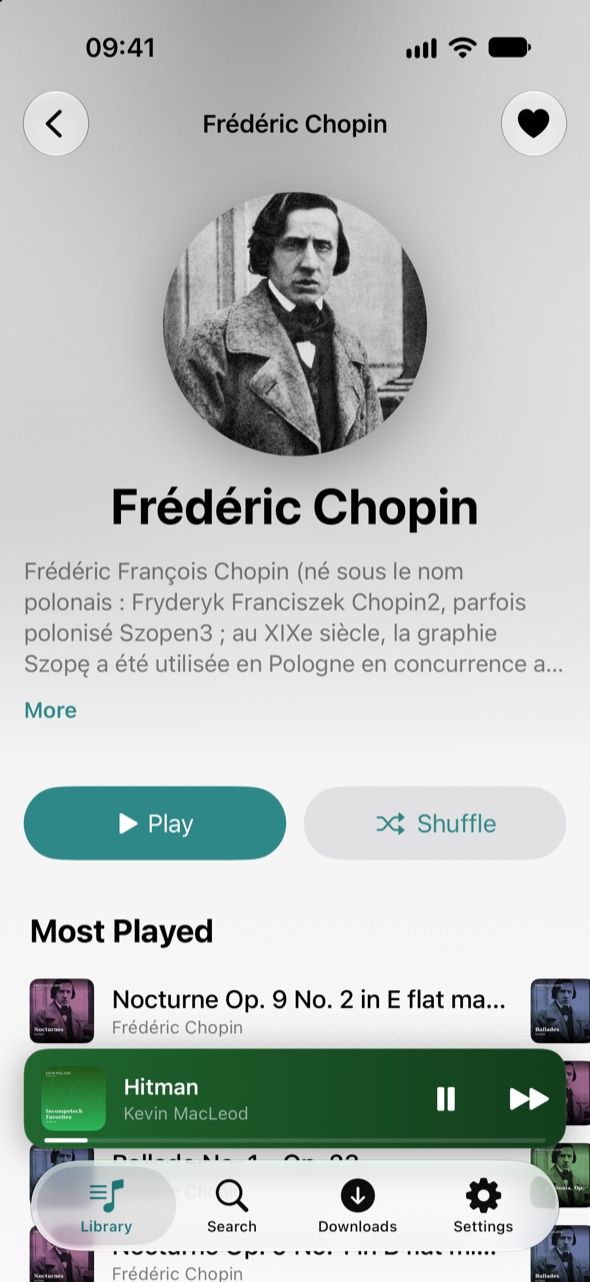
    The artist’s photo, their bio (translated on your device with iOS 18), their most played songs and their albums in release order. Add your Ticketmaster key to see upcoming concerts.

    An artist page: photo, bio and most played songs

A full-screen visualizer

Tap the artwork: liquid light follows the tempo, opens up on the chorus and carries the synced lyrics. The screen stays on, so you can mirror it to a TV with AirPlay.

Up Next, your way

Play Next, add to the queue, reorder or swipe to remove. Shuffle and repeat, from the Lock Screen too.

The music keeps going

When the queue ends, Autoplay carries on with similar songs picked by your server. Touch and hold a song to start its radio.

Audio engine

Not a gap.
Just like the record.

Andia has its own audio engine: songs flow into each other without silence, and upcoming ones are prepared ahead of time so they start right away.

Gapless

The last note of one song meets the first note of the next, the way the artist intended.

Crossfade

If you like, one song fades out as the next one rises. Adjustable, and never within the same album. With Andia Plus.

  • Upcoming songs are ready before they’re due
  • Normalized volume, without clipping
  • Sleep timer, after a delay or at the end of the song

Stations and mixes

Sit back and
listen.

Out of ideas? A station digs into your library: forgotten songs, ones you’ve never played, a decade or a mood.

Stations

  • Random Mix
  • Not Played in a While
  • Never Played
  • ’80s
  • ’90s
  • The 2000s

Moods

  • Feel Good
  • Party
  • Chill
  • Melancholy
  • Energy
  • Focus

Mood mixes are built from the genres in your library.

Radio

From any song, album or artist, or from the song that’s playing.

Autoplay

When the queue ends, songs close to the last one you heard take over.

Live Radio

Your country’s most popular stations, search by name and your favorites, with the current song on the Lock Screen.

Offline

Take your music
with you.

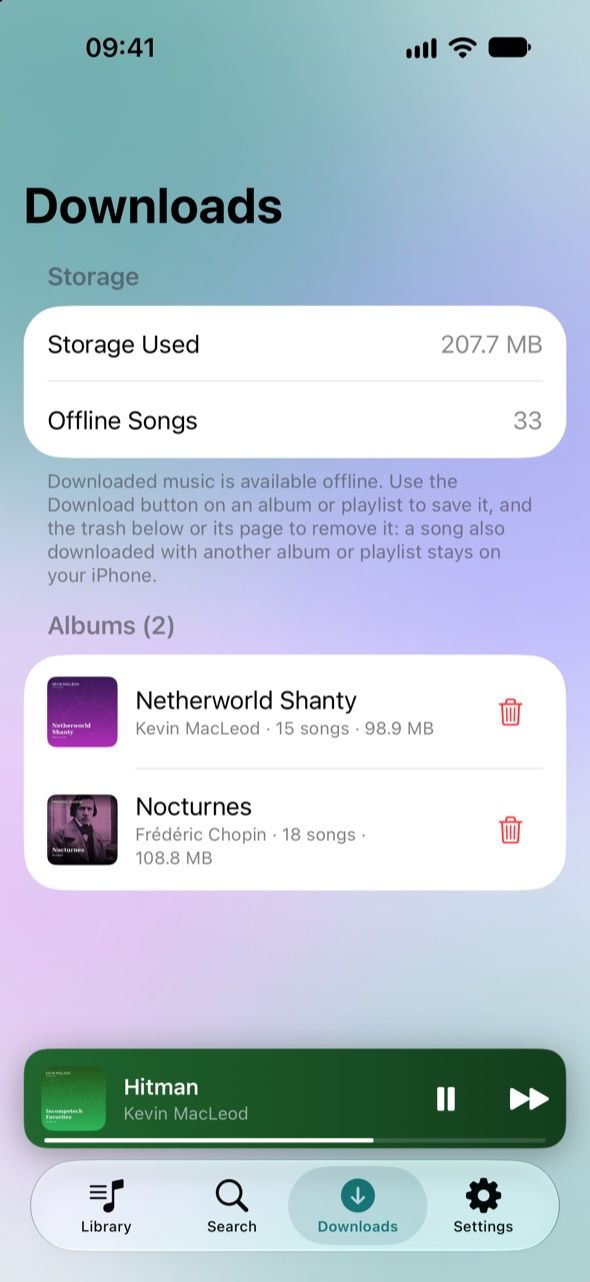
Download albums, playlists or all your favorites and listen without a connection: on the subway, while traveling, or to spare your data plan.

Downloads: albums kept offline

Always up to date

Downloaded favorites and playlists keep themselves up to date: a new heart, a song added, and it lands on your device by itself. A song shared by two albums or playlists is stored only once.

A cache that remembers

What you play stays on your device, from 1 to 10 GB as you choose, with your favorites the last to go. Replaying downloads nothing again.

Offline mode

One tap, and the library shows and plays only what’s downloaded, even with a connection. Stations pick from what’s on your device.

The quality you want

Set separately for Wi-Fi, 4G/5G and downloads, from the original file down to 128 kbps.

Rewind

Your music,
looking back.

Listening time, top artists and albums, genres, favorite hours: a recap to flip through all year long, over 7 days, 30 days, a year or since the very beginning. With Andia Plus.

212h

that’s 318 full albums

+32% on last year

  • Rock
  • Electronic
  • Jazz
  • Pop
  • Folk
  • Hip-hop

Evenings

7 plays

of the same song, in a single day

Computed on your device, never sent anywhere. Example figures.

Everywhere

Wherever
you go.

Lock Screen, AirPlay, widget, Siri: your music follows you across the system. And with Andia Plus, on Apple Watch, even when your iPhone stays at home.

Apple Watch

Send albums, playlists or your favorites to the watch, then listen with Bluetooth headphones, no iPhone or network needed. Your plays sync back to your server afterwards. With Andia Plus.

CarPlayComing soon

Home, albums, artists and playlists on your car’s screen, with shuffle and “Up Next”.

  • Lock Screen and Control Center
  • AirPods, speakers and AirPlay
  • Home Screen widget
  • “Hey Siri, play my favorites on Andia”
  • VoiceOver and larger text sizes

Pricing

Free.
And even more with Plus.

Listening is free, with no subscription and no ads. Andia Plus, a one-time in-app purchase, adds the extras music lovers enjoy.

Andia

Free

  • Your whole library, search and lyrics
  • Playlists created and edited on your server
  • Gapless, hi-res playback with volume normalization
  • Unlimited offline downloads
  • Stations, mixes and live radio
  • Widget, Lock Screen, AirPlay and Siri

Andia Plus

$7.99, once

  • Rewind: your listening stats and year in review
  • Your music on Apple Watch, without your iPhone
  • Ten-band equalizer with presets
  • Adjustable crossfade
  • Choose which music libraries to show
  • Your listens sent to Last.fm and ListenBrainz, even offline
  • Shared with your family, on all your devices

Andia Plus is bought in the app (Settings › Purchases & Subscriptions) and restored on your other devices. Prices may vary by country.